

Images, scans & photos
Turn Scans, PDFs and
Images into
Searchable Text
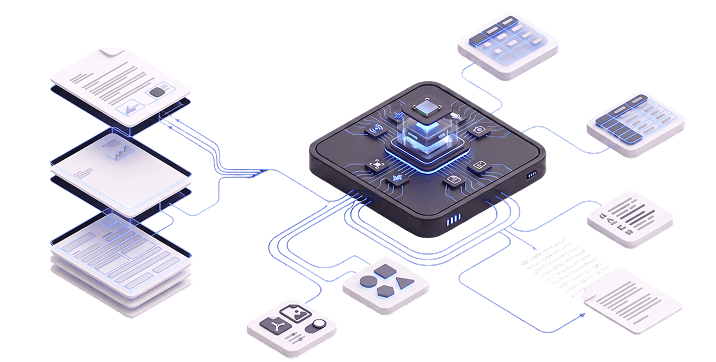
Our AI OCR Tools convert images, scans, photos, screenshots, PDFs and forms into searchable text. Preprocessing corrects orientation, perspective and noise; layout analysis and OCR model routing then reconstruct reading order, tables and text regions.
Controlled LLM post-processing can correct probable errors, restore structure, translate content and locate terms. This is not a generic scanner or OCR library, but a governed pipeline configured for your documents, languages, source quality, outputs and systems.

Why does visual document processing become a bottleneck?
- Text remains trapped in pixels and unavailable to search, indexing and automation
- Flat text conversion can lose reading order, tables, forms and page structure
- Employees must open, review, retype or reconstruct information manually
- Recognition quality varies with language, layout, resolution and source condition
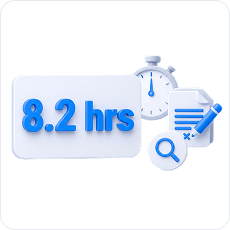
per week spent finding, recreating and correcting documents (Adobe/APQC)
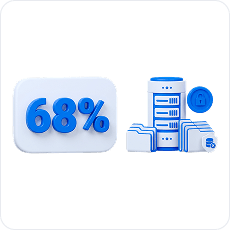
of enterprise data unused in Seagate’s Rethink Data study — not OCR-specific
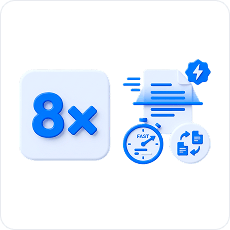
median-time gap in a 2024 clinical task: 18 seconds with OCR versus 144 seconds manually
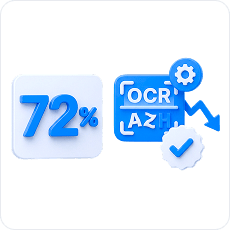
reduction in character error rate; word error rate fell 52.49% in one historical-document study
How the system turns visual documents into usable text
One pipeline processes varied document types without forcing the organization to replace its current DMS, CMS, storage or downstream systems.
Operator intake & review
Upload files or batches and select a profile, language and output. Compare source and text, inspect confidence, then correct, rerun, compare, approve or export.
Document-specific preprocessing
Profiles correct rotation, skew, perspective and curvature, and remove backgrounds, shadows and noise. They normalize contrast, split pages, locate text regions and assess quality.
Layout & reading order
The system identifies headings, paragraphs, columns and lists; tables, footnotes and form fields; images and non-content regions, keeping independent blocks separate.
OCR model routing
Printed text, handwriting, numbers, tables and mixed-language pages can use different models. Selection depends on language, font, quality and layout; volume, speed and deployment requirements.
Controlled LLM post-processing
A contextual layer can correct probable errors, rebuild words and lines, restore structure, normalize formatting and translate text. Original OCR output and confidence are retained.
Files in. Searchable, machine-readable text out
The pipeline validates and queues files, tracks status and connects document sources to operator review and business systems through controlled interfaces and APIs.
Document inputs
Email & storage
PDF, screenshots & forms
API, SFTP & batch
Document AI pipeline
Validation, format detection & queue
Preprocessing & quality assessment
Layout & reading order
OCR routing & page processing
Correction, formatting & translation
Review, search & output API
Business outputs
Searchable PDF & text
JSON, matches & coordinates
DOCX, HTML & Markdown
Translation, status, confidence & errors
Document access for teams. Machine- readable content for systems
The same OCR layer supports document-intensive organizations while preparing recognized content for search, reuse, downstream automation and knowledge systems.
Document-intensive operations
Archives & public records
historical materials, registers, multipage archives and documents without a text layer
Legal & consulting
contracts, appendices, protocols, regulatory materials and archived correspondence
Finance & insurance
applications, invoices, certificates, questionnaires, forms and customer documents
Healthcare & service
questionnaires, referrals, applications, forms and other visual materials
Manufacturing & logistics
specifications, waybills, schedules, technical documents, labels and supporting materials
Digital & AI workflows
Customer attachments
photos, screenshots, PDFs and files received through email, forms or other channels
Searchable document estates
full-text access to scans, visual PDFs and previously isolated archives
Multilingual access
original text, language-specific processing, terminology dictionaries and parallel translation
RAG & knowledge systems
machine-readable content prepared for indexing, retrieval and corporate knowledge workflows
Connected operations
recognized text, search matches, coordinates and status data delivered to approved systems
Recover the
structure. Not just
the characters
Basic OCR can flatten a complex page into an unreliable text stream. Preprocessing, layout analysis and model routing preserve how the document is organized before controlled post-processing prepares the result for use.
What the pipeline preserves on a complex document page
- Correct orientation, perspective and page boundaries
- Reading order across columns and independent regions
- Headings, paragraphs, lists, captions and footnotes
- Rows, columns and cell relationships in tables
- Form regions, images, stamps and signature areas
- Original OCR output, corrected text and confidence as separate records
We deploy AI OCR Tools around your documents and infrastructure
Deployment reflects document types and languages, processing volume and acceptance criteria. It also accounts for data requirements, chosen OCR and LLM models, and available infrastructure.
On-premises deployment
Components can run inside the client’s infrastructure; the final topology depends on model availability, workload and data-handling requirements.
Profile-based processing
Separate preprocessing, layout, OCR, dictionary and output profiles adapt the pipeline to each document class.
Confidence-based review
Thresholds can route low-confidence pages, selected error types or critical documents to operators for correction and approval.
What you receive
- File intake and batch processing with job status and operator controls
- Preprocessing and layout profiles for agreed document classes
- OCR model routing, multilingual dictionaries and controlled LLM post-processing
- Side-by-side review, source highlighting, confidence, correction and approval
- Required output formats; DMS, CMS, storage or API integrations; defined authentication, access and retention, with status and error models
- Representative test set, acceptance metrics, pilot results and an evolution plan
How we deploy AI OCR Tools in your document process
Implementation is configured around representative files, source channels, output requirements, quality criteria, review rules and target systems.
01
Discover
Define documents, sources and users; search, translation and layout; destinations, volume and SLAs.
02
Build the test set
Collect representative formats, languages, layouts, tables, handwriting and low-quality examples.
03
Classify
Group files by format and structure; language and quality; text, output and acceptance criteria.
04
Configure preprocessing
Set orientation, deskewing and dewarping; cleanup and contrast; page splitting, regions and scaling.
05
Select the model stack
Test printed, multilingual, handwriting, table and layout models, dictionaries and LLM post-processing.
06
Design review & integration
Set search, matching and highlighting; operator review, confidence thresholds and approval; APIs, retention, authentication and access.
07
Validate & pilot
Test an agreed scope: character and word errors; reading order and tables; translation and search; review share, speed and API stability.
08
Launch & evolve
After metrics are accepted, connect production systems and expand documents, languages, profiles, outputs and interfaces.

Questions before
deployment
Here are the questions our clients ask us most often
Can we host on-premises?
The system can be deployed within client infrastructure, subject to the chosen OCR and LLM models, processing volume, data requirements and available infrastructure.
How do AI OCR Tools differ from ordinary OCR?
They combine image preprocessing, page-layout analysis and OCR model routing with controlled contextual post-processing. Search, translation, operator review and API integration make the result more than a character stream.
How do they differ from Data Extraction AI?
AI OCR Tools make visual documents machine-readable and reconstruct their structure; Data Extraction AI identifies and validates specific business fields, entities, relationships and events for downstream systems.
Can the system process phone photos, handwriting and multilingual documents?
Yes, for supported document and language profiles, with expected quality established on representative client samples and dedicated preprocessing or recognition models where required.
Can it preserve layouts and tables while finding requested terms?
It can reconstruct supported structures and return matches with page, coordinates and context, while accuracy depends on source quality and layout complexity.
How is quality assessed and manual review controlled?
Validation can assess character and word error rates; reading-order and table accuracy; translation and search quality; speed and review share. Low-confidence or critical pages are routed to an operator.
Product consultation
Want to turn visual
documents into
searchable,
automation-ready text?
documents into
searchable,
automation-ready text?
We will assess your files, configure the preprocessing, layout, OCR and LLM pipeline, create the review workflow and connect the results to your existing systems.