

Documents, PDFs, scans & forms
Data Extraction AI: Turn Documents, Calls and Files into Structured Business Data
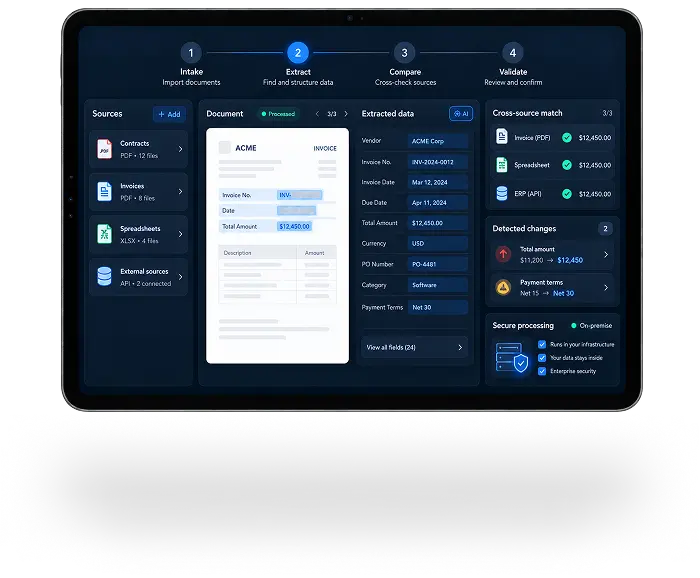
Our Data Extraction AI systems identify fields, entities, relations, facts and events in documents, OCR-processed scans, email, forms, tables, messages, call transcripts and files. They normalize and validate the results, then deliver structured JSON, records and events to CRM, ERP, BI, DWH or internal workflows.
The product is not OCR or a basic parser. It is a governed data-processing layer that combines source adapters, configurable extraction schemas, business rules, entity resolution, confidence, human review and data lineage.
Why is manual data extraction difficult to scale
- Important facts remain embedded in documents, calls, email and files
- Manual re-entry creates omissions, duplicate records and inconsistent formats
- Values cannot be trusted when their source and validation history are missing
- Downstream systems cannot act reliably on incomplete or ambiguous data
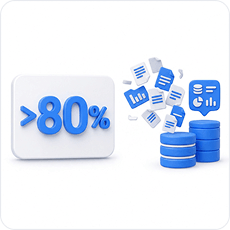
of organizational data may be unstructured
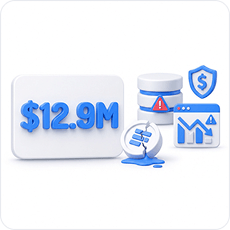
of an analyst’s time may go to creating and preparing datasets

average annual cost of poor data quality reported by Gartner
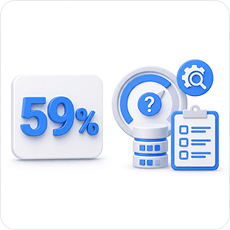
of organizations do not measure data quality
How the system turns unstructured sources into verified business records
The same extraction layer supports operational, data and IT teams without replacing upstream OCR, speech-to-text or parsing tools, or the systems that consume the results.
Extraction schemas & profiles
Define field names, types, formats, required values, transformations, source priority, confidence thresholds, target fields and review conditions for each process.
Source adapters & case grouping
Uploads, email, SFTP, storage, databases, APIs and webhooks bring documents, tables, transcripts and related files into a common case.
Contextual extraction
Agentic logic identifies fields, entities, relations and events, resolves context, detects missing data and selects the appropriate extraction profile.
Normalization & entity resolution
Dates, currencies, units, addresses, identifiers, statuses and categories are standardized, then matched to existing records or routed as new or ambiguous entities.
Validation & business rules
Format, range, reference, completeness and cross-source checks expose conflicts, duplicates and unsupported values before data reaches downstream systems.
Sources in. Verified business records out
The pipeline accepts source objects through uploads, email, SFTP, storage, databases, APIs or webhooks. Adapters prepare the content; extraction and validation route approved records to target systems and exceptions to human review while preserving lineage.
SOURCE INPUTS
Calls, audio & transcripts
Email, messages & attachments
Tables, storage, databases & APIs
DATA EXTRACTION AI PIPELINE
Ingestion & case grouping
OCR, ASR & source adapters
Fields, entities, relations & events
Normalization, matching & validation
Straight-through processing & human review
Lineage, output API & workflow actions
Business outputs
JSON, fields & matched entities
BI, DWH & data lake events
CRM & ERP records
Tasks, webhooks, reports & workflows
Ready-to-use records. Evidence for every value
Finance, insurance, banking, legal, HR, logistics, manufacturing, healthcare, sales, customer service and data teams can use the same controlled extraction layer, with outputs configured for each role.
Operations & process view
Completed record
extracted and normalized fields, matched entities, validation status and target-system mapping
Exceptions & missing data
absent values, ambiguous matches, source conflicts, failed rules and required corrections
Evidence for each field
source document, page, span, coordinates, confidence and extraction profile
Next operational action
approval, correction, task, follow-up, status update or workflow continuation
Processing status
queue and review status, destination, delivery result and error details
Data, IT & leadership view
Process performance
processed volume, straight-through rate, processing time, share requiring manual review, SLA and cost
Data quality
completeness, confidence, validation failures, correction patterns and error types
Analytics-ready output
normalized records, source distribution, validation events and datasets for BI and DWH
Integration control
field mapping, API and webhook status, idempotency, retries and error model
Audit & lineage
sources, profiles, model versions, validations, operator corrections and business events
Extract the
business fact.
Not just the text
OCR can read an invoice. Data Extraction AI maps its values to the agreed schema, matches the supplier and order, checks totals and references, and decides whether the record can continue automatically.

What the system checks before creating an ERP record
- The invoice number is present and follows the required format
- The supplier and buyer match existing records or enter entity review
- Line items, tax, currency and total are internally consistent
- The purchase-order reference matches the corresponding order
- Each value retains its source location, confidence and validation result
- Validated records continue automatically; exceptions enter human review
We deploy Data Extraction AI around your sources and systems
The solution is configured around source types, data requirements, model choices, processing volume, processing time, review rules and target integrations. Relevant components can be deployed within client-controlled infrastructure under the agreed architecture.
Client-controlled deployment
Intake, extraction, validation, storage and API components can run within client infrastructure where supported by the agreed data, model, performance and integration requirements.
Connected upstream services
OCR, speech-to-text, document parsers, databases and APIs connect through approved adapters; Data Extraction AI uses their outputs rather than replacing them.
Controlled processing routes
High-confidence records that pass validation can proceed automatically, while missing, ambiguous or conflicting values enter human review.
What you receive
- Source connectors and adapters for documents, email, calls, files, storage, databases, APIs and webhooks
- Configured extraction profiles and schemas for fields, formats, transformations, thresholds and target mappings
- Agentic extraction for fields, entities, relations, events, context and missing-data detection
- Normalization, entity resolution, deduplication, business rules and cross-source validation
- Human-review interface, straight-through processing, confidence, source spans and data lineage
- CRM, ERP, BI, DWH and workflow integrations with logging, monitoring and an evolution plan
How we deploy Data Extraction AI for your business
Implementation is configured around your sources, schemas, validation rules, review process, quality criteria and target systems.
01
Discover
Map sources, manual transfers, checks, errors, decisions, processing volume, roles and SLA requirements.
02
Define
Specify use cases, extraction schemas, outputs, target systems, criticality, review rules and acceptance criteria.
03
Prepare sources
Collect historical examples and configure the required OCR, speech-to-text, parser, database and API adapters.
04
Configure extraction
Build profiles for fields, entities, relations, events, context, missing data and profile routing.
05
Normalize & resolve
Connect dictionaries and master data; standardize formats, categories, identifiers and statuses; define matching and merge rules.
06
Validate & review
Configure mandatory, format, range, reference, completeness, duplicate and cross-source checks, plus the exception interface.
07
Integrate & test
Define authentication, APIs, webhooks, callbacks, idempotency, mappings, retries and errors; measure field accuracy, precision, recall, completeness, entity-match accuracy, validation accuracy, processing time and review rates.
08
Pilot & evolve
Pilot one bounded process, connect live systems, monitor drift, errors, corrections, SLA, cost and data quality, then expand sources, fields, profiles, rules, integrations and workflows.
Questions before
deployment
Here are the questions our clients ask us most often
Can relevant components run in our infrastructure?
Yes. The deployment model is selected around data requirements, model choices, performance and integrations, and can include components running within client-controlled infrastructure.
How is Data Extraction AI different from OCR?
OCR converts visible text into machine-readable text; Data Extraction AI identifies business fields and relationships, normalizes and validates them, and sends approved results to target systems.
Can the system combine several sources in one case?
Yes. Documents, email, files, transcripts and system records can be grouped, matched and validated against one another.
Can we define our own fields and validation rules?
Yes. Extraction schemas can specify field types, formats, required values, transformations, source priorities, confidence thresholds, target mappings and review conditions.
What happens when confidence is low or sources conflict?
The affected field or record is routed to human review with its source evidence, confidence, validation status and proposed correction.
Can approved results update systems and trigger actions?
Yes. Validated output can create or update records, write data to BI or DWH, create tasks, send webhooks or start an approved workflow.
Product consultation
Want unstructured
information to become
ready-to-use business
data?
information to become
ready-to-use business
data?
We will map your sources, extraction schemas, validation rules, review process and integrations so verified data can flow into CRM, ERP, BI or internal workflows.